Ford Ka Radio Code Generator
Calculate your original code by entering your radio serial number.
Ford Ka radio code by model
Get the original security code for your Ford Ka car radio.
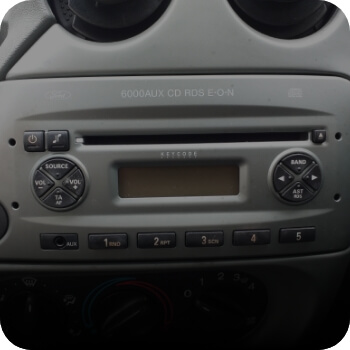
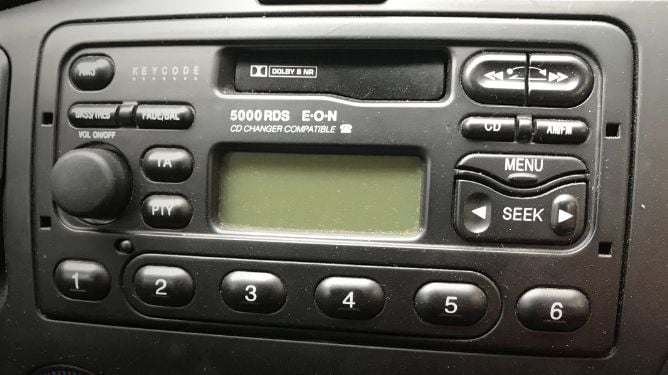
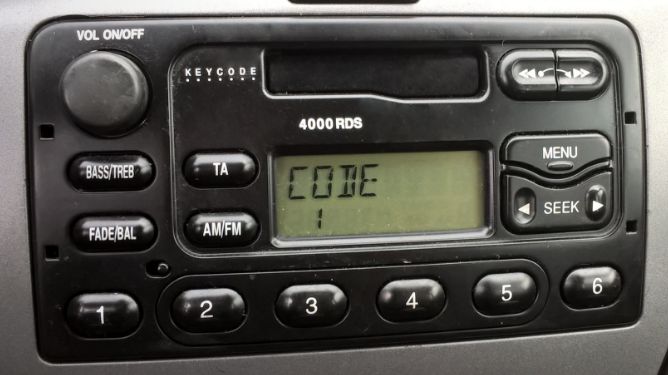
Why is my Ford Ka asking for a radio code?
It happens more often than you think — here's why, and how to fix it in minutes.

You get in your Ka, turn the key, and the radio screen says CODE instead of playing music. This is Ford's built-in anti-theft system — every time the battery is disconnected, the radio locks itself and demands a 4-digit security code to start working again.
The most common reasons this happens on a Ka: the battery went flat after the car sat unused for a while, a mechanic disconnected it during a service, or — the most frequent one — you bought the car second-hand and the previous owner never passed on the code card. Since most Kas on the road today are over 10 years old, the original code card is long gone in the majority of cases.
The first generation Ka (1996 – 2008) came with 4000 RDS and 5000 RDS units, while the second generation (2008 – 2016) uses the 6000 AUX CD. All three models are supported — just enter the serial number in the form above and the original code is calculated instantly.
Looking for a Ka+ (2016 onwards)? The Ka+ uses a different Sync-based infotainment system that does not require a radio code.
How to find your Ka radio serial number
The serial number is the key to calculating your 4-digit code. Here's how to locate it on your Ford Ka.
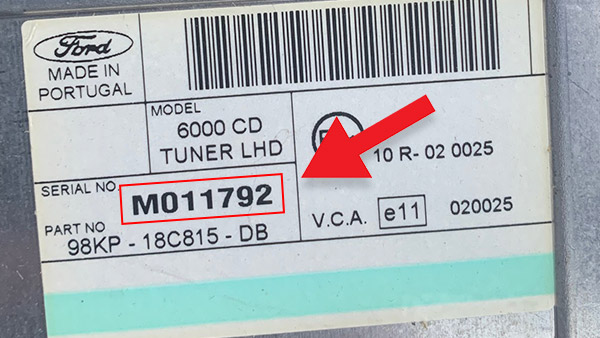
From the unit label
The serial is printed on a white barcode sticker on the casing of the radio itself — you'll need to pull the unit out to see it. The Ka's dashboard is compact, but the radio slides out easily with proper extraction keys (two pairs, inserted into the four small holes on the faceplate). No keys? A bent coat hanger or two thin flat-head screwdrivers will do the job.
On the label, look for SERIAL NO followed by a code starting with V (e.g. V053729) or M (e.g. M290101). Ignore the part number — that's a different field.

On-screen display (6000 AUX only)
Second-gen Ka owners (2008 – 2016) with the 6000 AUX radio can skip the removal entirely. With the radio on, hold buttons 1 and 6 at the same time for about 20 seconds. The display will cycle through several diagnostic screens — wait for the one that shows a code starting with V.
Don't confuse it with the part number or software version that appear earlier in the cycle — the serial is always the last value shown, and it starts with the letter V followed by six digits. This trick only works on the 6000 AUX; older 4000 and 5000 RDS radios don't support it.
How to enter your Ka radio code
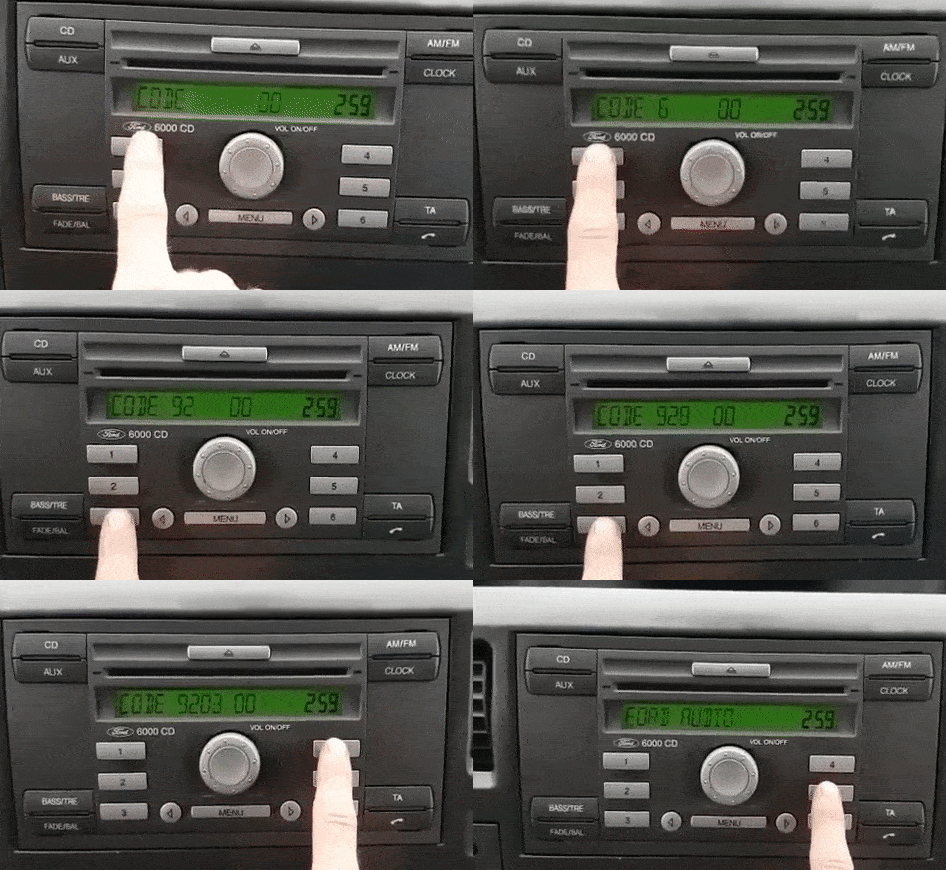
The process is the same for the 4000 RDS, 5000 RDS and 6000 AUX — only the preset buttons are used, no menus involved.
- Turn the ignition to position II so the radio powers on. The display should read CODE _ _ _ _. If it says LOCKED or WAIT, see the troubleshooting section below.
- Press button 1 repeatedly to set the first digit. Each press cycles through 0 – 9. For example, if your code starts with 3, press it three times.
- Repeat with buttons 2, 3 and 4 for the remaining digits. Take your time — there is no timer.
- Double-check the four digits on the display, then press 5 to confirm. The radio will unlock immediately and start playing.
Tip: if you make a mistake mid-way, just keep pressing the button to cycle back to the correct digit. There's no "backspace" — each button only controls its own position.
What if something goes wrong?
Don't panic — both of these situations are recoverable.

The screen says LOCKED
This happens after too many incorrect attempts — usually because the previous owner tried random codes before selling the car. Don't worry: hold button 6 for about ten seconds. On most Ka radios this clears the lock and gives you three fresh attempts. If it shows LOCKED 13 instead, the radio has entered a deeper security stage that only a Ford dealer can reset — but this is rare.
The screen says WAIT
This is just a cooldown timer — the radio makes you wait roughly 30 minutes after a wrong entry before you can try again. Leave the ignition on (engine off is fine) and don't press anything. When the timer runs out, CODE will reappear. Important: turning the radio off and back on restarts the full 30 minutes, so be patient and let it count down.
Frequent questions about Ka radio codes
Answers to the most common questions we receive about Ford Ka radios.
 4.9 — 24 reviews
Rating and reviews
Read the reviews that have left the customers and visitors of this page.


It stay locked
Excelente vale lá pena. Ló recomiendo 100%
code worked perfectly Thanks
Awesome, got the code I needed. Thanks
A very easy way to get code. Thank you. Very good service..
This is fast !!!
Very simple and it worked!
Hat schnell und problemlos geklappt ????????
Nu merge codul primit
Are khoj Raha do
Konnte es noch nicht ausprobieren.MfG
You can get the code instantly in your mail or message after pay with a few seconds it’s no wasting time.
Brilliant!! Code you gave me worked. Happy owner????
Got the code within 10 seconds. Works great. Thanks!
WoW! That was quick!!! They sent the code in less than 60 seconds after I uploaded the information .
Que tal yo e tenido 10 intentos y ya no puedo meter otro intento más como le puedo hacer ahi
perfect thank you
Great thanks a lot! Best regards to the whole team
No lo he probado aún, ando esperando los 30 minutos de penalización aunque juzgando las reseñas de seguro que funciona, lo que no entiendo es por qué me querían hacer pagar siete euros y luego de intentarlo varias veces me dejó hacerlo gratis xddd
Thanks, ive struggling for weeks and the car ended up put a timer for pike 25 mins because of the attempts, thank you so much!!
Very recommended! Fast and what is important for free.
It works. After an initial 30 minute penalty I found this site :-)
This site is good and true really
Exellent, Super weitergeleitet und ist für die Gebühr von 6,99 € akzeptabel!!!