Ford Focus Radio Code
Retrieve your Ford Focus radio code at the instant by the radio serial number.

How do I get my Ford Focus radio code?
- Hold 1 and 6 buttons to display the serial number.
- Enter the 7 or 12 chars serial (i.e V100122 or BP1020A3900112) in the online generator.
- Click on "Calculate" to display your 4-digit Focus radio code.
- Use the pin to activate your radio.
Your code in 3 steps
Get your 4 digits radio pin in three simple steps. The calculation takes seconds! View video.

Find the serial number
Find the serial number of your Ford Focus radio by following the simple instructions.

Generate your 4 digits code
Enter the serial number into the calculator and follow the simple steps to generate your activation pin.

Activate your radio
Make the payment and receive the code instantly, after that, enter it on the radio to start enjoying your music again.

6000CD (2004 - 2007)
You can calculate the radio activation code for your Focus radio from the identification number that you can find for this model, either on the screen or on the rear or side label. Hold down buttons 1 and 6 and wait 20 seconds to see the serial, which starts with the V letter. Example: V120290. You can see how to do it step by step on finding 6000 CD serial page.
Unlock 6000 CD pin6000CD (2008 - 2012)
You can unlock the code for the latest model 6000 CD radio in Focus cars from the serial number that you can see on the radio screen. To display this serial, turn on the stereo unit and press and hold buttons 1 and 6 for a few seconds. You will see different information appear on the screen. The number we are looking for appears last with this format: V123456. If you can't locate this number, check the exception explained on this page.
Generate pin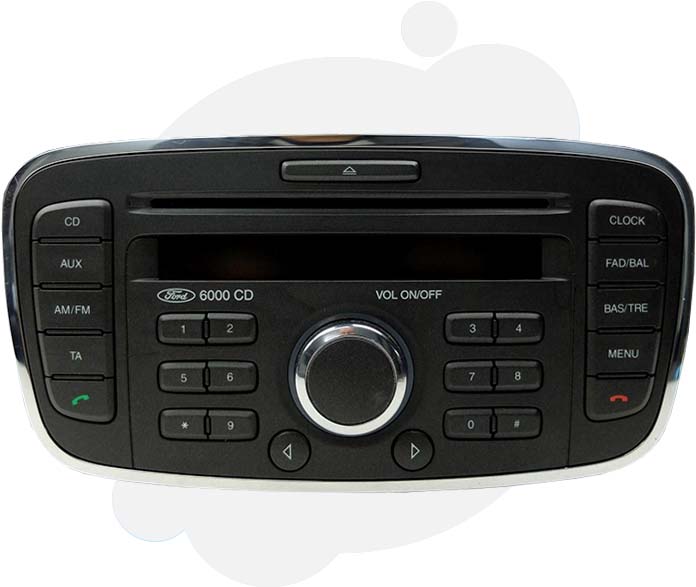
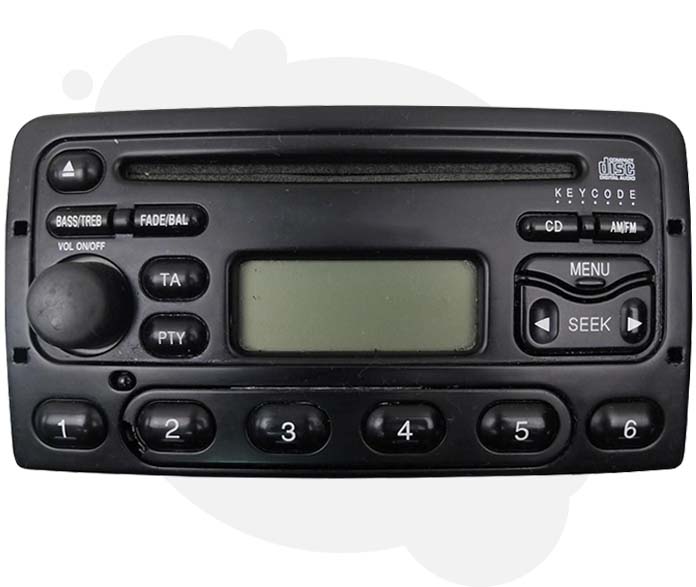
RDS EON Models (1998 - 2003)
Get the activation code for this old cassette or CD unit from the serial number that you can find on the side and top sticker. Use the four extraction holes to pull out the radio. For this, you must use removal keys like these. If you don't have the extraction keys, you can even use four nails or screwdrivers. The unit comes out very quickly. See this example: How to pull out without keys. Once out, use the M series to reset your radio.
Calculate from M serialSony (2008 - 2015)
Calculate the activation key-code for the Sony Focus model from the serial number that appears on the screen when you press and hold buttons 1 and 6 for several seconds. Make sure you turn on the stereo unit before. After about 30 seconds, you will be able to see this identification number for a moment with this format: SOCX1AV123456. We suggest you take a video with your mobile phone to pause it and see correctly the serial number.
Get activation key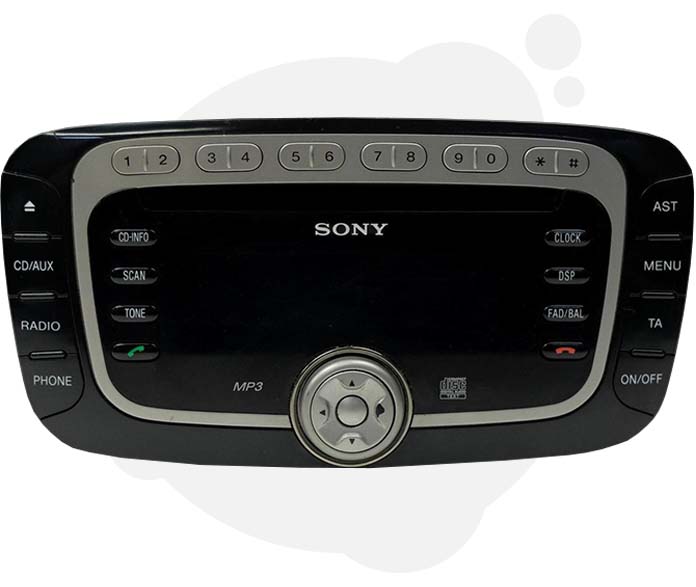
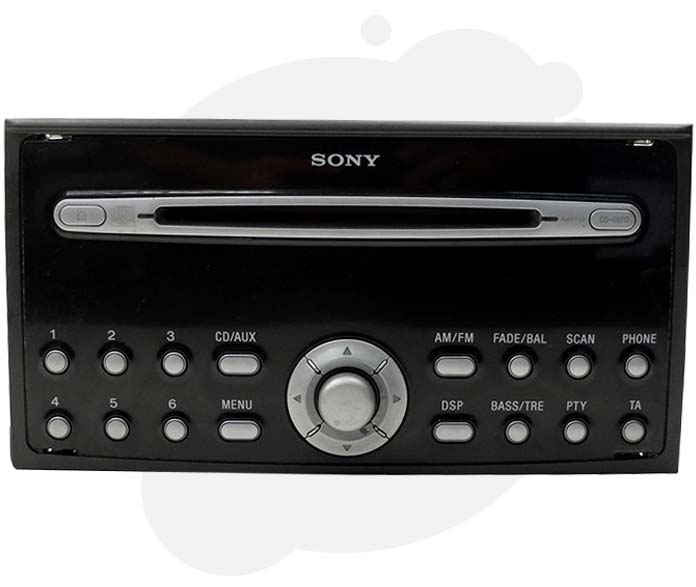
Sony (2004 - 2007)
Carefully remove the radio unit from the centre of the console. To do this, you need extraction keys like these. Take note that this model does not show the serial on the screen. Once you have taken out the radio, you will be able to see the serial number you need to calculate the pin on the label affixed to the side of the unit. This model has an M series identification number. Example: M123938. With this serial your are rady to get the radio code for Ford Focus.
CalculateTravelpilot EX Navi (2004 - 2007)
Retrieve the anti-theft pin of your Blaupunkt Travelpilot EX navigation from the 14-digit serial number that you can find on the label attached to the side of the box. This label is only visible when you remove the unit from the centre of the console, and for this, you must use keys like this. Insert the extraction keys and make pression on opposite sides while pulling out. See how to do it in this video: how to pull out my navigation. Once this label is visible, identify the serial number that begins with BP, C7, 815 or 811.
Unlock

Blaupunt Travelpilot FX Navi (2006 - 2015)
You can only calculate the Sat Nav pin for your C-max or S-max from the 12-digit ID number on the back of the radio. To see this number, which starts with BP or C7, pull out the stereo unit from the centre console. Once outside, please take a photo of the top and side label to keep it as evidence. This serial is all you need to retrieve your code radio Ford Focus.
Calculate device PINAny original device
Several other models can be found in Ford Focus cars. However, the code recovery process is similar for all of them. Whatever the model, you must remove it from the centre of the console and identify the serial number. If you are unsure which one is your serial, send us a photo of the label on the chat and we're going to help you out.
Calculate
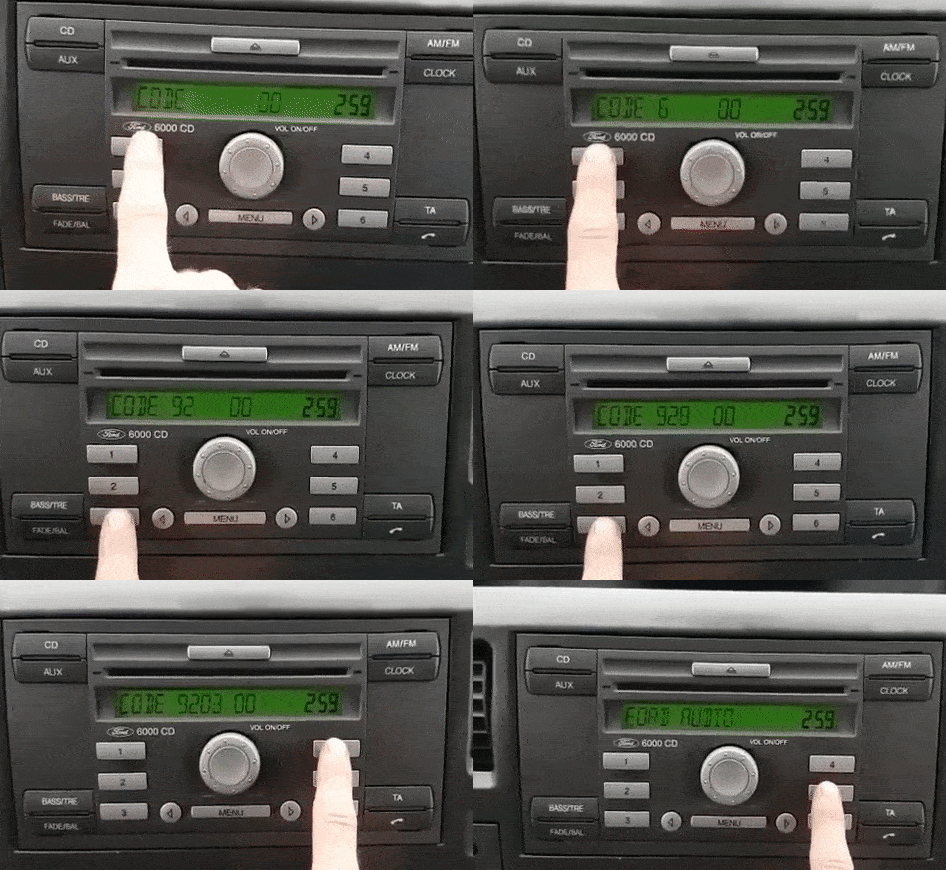
Enter Ford Focus radio code
- Turn your Focus radio ON and ensure you read 'CODE' on screen.
- Repeatedly press button 1 until you see the first digit of the code.
- Repeat the same process with buttons 2, 3 and 4 for the remaining digits.
- Press button 5 to submit the pin. Your radio should start working.
Frequent questions
The most common doubts based on what the people ask us by chat.
 4.6 — 190 reviews
Rating and reviews
Read the reviews that have left the customers and visitors of this page.


Fab. Worked first time
EXCELLENT
PERFECT, RECEIVED CODE IN LESS THAN 30 MINUTES AND WORKS PERFECTLY. MANY THANKS.
Code 1194 didn't work on my radio (AUZBZ7F0991307) please help me. My email: jakub-prchal@seznam.cz
The code do not work for my audi tt concert not response to email bad experience
Never got the code I paid for
Do not work if you want i Will send you all fotos
Comunication cloud be better, it took about 11 days to get the code. It started to look like a scam but it is not scam. Code works fine so i recommend this site even for audi radios.
Cela a pris du temps pour le poste de mon Audi tt mais cela marche et la communication fut bonne avec le site qui m'a même proposé de me rembourser si je ne pouvais attendre. Je recommande ce site sans hésitation.
No code did not work even sent in extra info,told to wait still don’t arrive 4 days in total have asked for a refund received no correspondence
rapide et fiable
Code did not work?
Thanks for radio codes
My radio is working , thanks a lot!!
Great stuff !! Once I found the serial number for the radio, it was easy peasy to have the code generated. Many thanks.
Worked perfectly! So simple to set up ????
I had to add the letter V in front of the only six digit number identified as a serial and I had to add a leading zero (as first number) as the radio was a Sanyo made in Malayasia but assembled in Canada. The zero was slurred / over written with a # sign. I had to figure it out on my own.
I have forget my code
i paid for this and they gave me the wrong code and it didn't work.
oh my god the site is brilliant I managed to regain access to the radio thanks to this site and I highly recommend it with a clear conscience POLAND THANKS
All good and very quiw
Indian nellore
Easy process - code worked.
Haven't received a code despite paying for it.
Wow bloody life saver the instant relief THANK YOU SIR ????????
Perfect, 2 seconds for code en working radio!! ????????????????????????????????
The code not working incorect pin
Code did not work
Radio code worked first time, thanks a million !
Superb instructions in tutorial. Generated the code and worked first time. 2 weeks without a radio after battery change. So happy. Thank you very much.
Your scammers and should be locked away
Nagyon jó és gyors
quick response and code worked ok. thank you.